


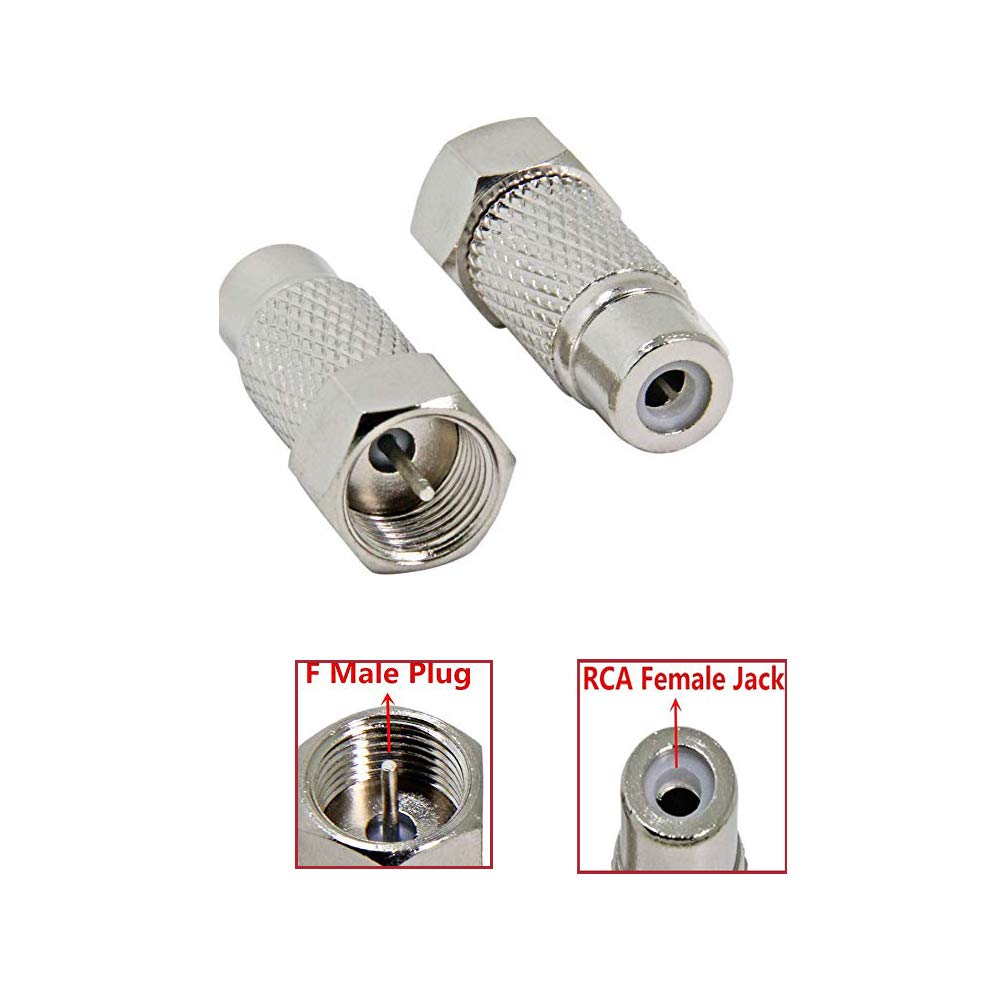
WICAREYO RF to Coax Adapter - 2PCS F Type Female to Male Plug, Silver, Compatible with Atari 2600, Model 8414831193664
WICAREYO RF to Coax Adapter - 2PCS F Type Female to Male Plug, Silver, Compatible with Atari 2600, Model 8414831193664
Out of stock
Couldn't load pickup availability
Guarantee safe checkout

Sold by Gamex24, an authorized reseller.
Returns accepted within 30 days | support@gamex24.com
Shipping Information
- Free Standard Shipping — United States only
- Processing Time: 1–3 business days
- Estimated Delivery: 3–5 business days after dispatch
- Securely packed to ensure your purchase arrives in perfect condition
- Tracking number sent via email once dispatched
- Orders over $250 require signature upon delivery. Taxes calculated at checkout.
Returns & Refund
Returns accepted within 30 days of delivery.
Damaged or Defective Item
Free return shipping + replacement or full refund
Wrong Item Received
Free return shipping + replacement or full refund
Change of Mind
Return shipping at customer's expense · Item must be unused & in original packaging
Safety & Compliance
California Proposition 65 Warning
Some products sold on this website may expose you to chemicals known to the State of California to cause cancer, birth defects, or other reproductive harm.
www.P65Warnings.ca.govGeneral Product Safety Advisory
Always read the product label, instructions, and safety warnings before use. Do not use damaged or modified products. Store products in appropriate conditions as specified by the manufacturer.
Keep all products out of reach of children unless specifically designed for their use.
Product Authenticity & Notice
All products sold by Gamex24 are 100% authentic, sourced directly from authorized brand distributors. Product colors and dimensions may vary slightly from images due to screen calibration and manufacturing tolerances.
Gamex24 — Play. Compete. Repeat.


Description
Frequently Asked Questions
- Q: What is the purpose of the WICAREYO RF to Coax Adapter? A: The WICAREYO RF to Coax Adapter is designed to connect gaming consoles, like the Atari 2600, to a television using coaxial connections.
- Q: How do I connect the WICAREYO RF to Coax Adapter? A: To use the adapter, connect the F Type Male Plug to the TV connector and then connect the RCA end to the older RCA-style cable from your game console.
- Q: Is the WICAREYO RF to Coax Adapter compatible with other consoles? A: While the adapter is specifically compatible with the Atari 2600, it may also work with other devices that use similar coaxial connections. Always check compatibility before purchasing.
- Q: What is included in the package of the WICAREYO RF to Coax Adapter? A: The package includes two pieces of the F Plug Female Adapter, allowing for multiple connections or a backup.
- Q: What are the dimensions of the WICAREYO RF to Coax Adapter? A: Each adapter measures approximately two point four centimeters in size.
- Q: Is the WICAREYO RF to Coax Adapter an original product? A: No, the WICAREYO RF to Coax Adapter is a third-party product and not an original manufacturer item.
- Q: What materials are used in the WICAREYO RF to Coax Adapter? A: The specific material composition is not detailed, but the adapter features a silver finish, which is commonly used for durability and conductivity in connectors.
- Q: How do I ensure a good connection with the WICAREYO RF to Coax Adapter? A: Ensure that both ends of the adapter are securely plugged into the TV and game console. Check for any loose connections, as this can affect performance.
- Q: Can I use the WICAREYO RF to Coax Adapter with modern TVs? A: Yes, as long as your modern TV has a compatible coaxial input, you can use the adapter to connect older gaming consoles.
- Q: Are there any troubleshooting tips for the WICAREYO RF to Coax Adapter? A: If you experience issues, check the connections for any loose cables, ensure the TV is set to the correct input source, and confirm that the adapter is properly connected to the console.