


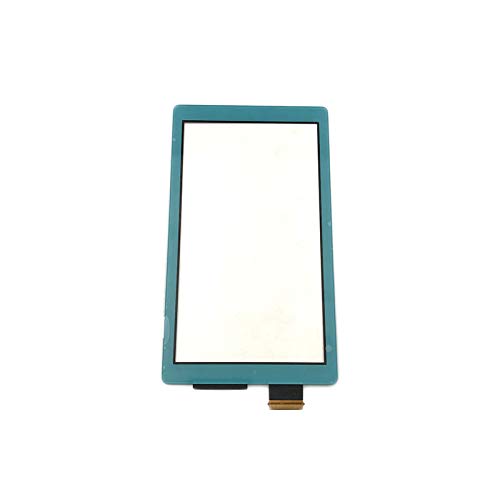
TheCoolCube Touch Panel Digitizer Replacement Screen for Nintendo Switch Lite - Blue
TheCoolCube Touch Panel Digitizer Replacement Screen for Nintendo Switch Lite - Blue
Out of stock
Couldn't load pickup availability
Guarantee safe checkout

Sold by Gamex24, an authorized reseller.
Returns accepted within 30 days | support@gamex24.com
Shipping Information
- Free Standard Shipping — United States only
- Processing Time: 1–3 business days
- Estimated Delivery: 3–5 business days after dispatch
- Securely packed to ensure your purchase arrives in perfect condition
- Tracking number sent via email once dispatched
- Orders over $250 require signature upon delivery. Taxes calculated at checkout.
Returns & Refund
Returns accepted within 30 days of delivery.
Damaged or Defective Item
Free return shipping + replacement or full refund
Wrong Item Received
Free return shipping + replacement or full refund
Change of Mind
Return shipping at customer's expense · Item must be unused & in original packaging
Safety & Compliance
California Proposition 65 Warning
Some products sold on this website may expose you to chemicals known to the State of California to cause cancer, birth defects, or other reproductive harm.
www.P65Warnings.ca.govGeneral Product Safety Advisory
Always read the product label, instructions, and safety warnings before use. Do not use damaged or modified products. Store products in appropriate conditions as specified by the manufacturer.
Keep all products out of reach of children unless specifically designed for their use.
Product Authenticity & Notice
All products sold by Gamex24 are 100% authentic, sourced directly from authorized brand distributors. Product colors and dimensions may vary slightly from images due to screen calibration and manufacturing tolerances.
Gamex24 — Play. Compete. Repeat.


Description
Frequently Asked Questions
- Q: What is the size of the Touch Panel Digitizer for the Nintendo Switch Lite? A: The Touch Panel Digitizer is specifically designed to fit the Nintendo Switch Lite console. It does not include dimensions, but it is tailored for this particular device.
- Q: What materials are used in the Touch Panel Digitizer? A: The Touch Panel Digitizer is made from high-quality glass. This ensures durability and a responsive touch experience for the Nintendo Switch Lite.
- Q: Does the Touch Panel Digitizer come with installation instructions? A: No, installation instructions are not included. Professional installation is recommended to avoid damage during the process.
- Q: How do I install the Touch Panel Digitizer on my Nintendo Switch Lite? A: To install, carefully remove the old screen and replace it with the new Touch Panel Digitizer. Professional technicians are advised for proper installation.
- Q: Is the Touch Panel Digitizer compatible with all Nintendo Switch models? A: No, it is only compatible with the Nintendo Switch Lite console. Ensure you have the correct model before purchasing.
- Q: Can I use my Nintendo Switch Lite while waiting for the new digitizer to be installed? A: No, the device should not be used without a functional touch screen. Using it without the digitizer can cause further damage.
- Q: What precautions should I take when handling the Touch Panel Digitizer? A: Handle it with care to avoid scratches or cracks. It's recommended to wear gloves and work in a clean, dust-free environment.
- Q: How should I clean the Touch Panel Digitizer? A: Use a microfiber cloth to gently clean the surface. Avoid using harsh chemicals or abrasive materials that can scratch the glass.
- Q: Is the Touch Panel Digitizer safe to use? A: Yes, it is safe to use once properly installed. Ensure that the installation is done correctly to maintain its functionality.
- Q: What should I do if the Touch Panel Digitizer arrives damaged? A: If it arrives damaged, contact the seller immediately for a return or replacement. Make sure to document any issues with photos.
- Q: How do I ensure the longevity of the Touch Panel Digitizer? A: Keep the device in a protective case and avoid exposing it to extreme temperatures or moisture to prolong its lifespan.
- Q: Can I return the Touch Panel Digitizer if I don't need it? A: Return policies vary by seller. Check with the seller for specific return conditions and timeframes.
- Q: What is included in the package when I purchase the Touch Panel Digitizer? A: The package includes one Touch Screen Digitizer for the Nintendo Switch Lite console. No other components are included.
- Q: Is the Touch Panel Digitizer suitable for beginners to install? A: No, it is recommended that only professional technicians install the digitizer due to the risk of damaging the device.
- Q: What color is the Touch Panel Digitizer? A: The Touch Panel Digitizer is available in blue. This color option is designed to match the Nintendo Switch Lite console.