


TEGRUP Joy-Con Charger Grip with Magnetic Phone Mount - Dual-Use Hinge, Upgraded Version, White
TEGRUP Joy-Con Charger Grip with Magnetic Phone Mount - Dual-Use Hinge, Upgraded Version, White
Out of stock
Couldn't load pickup availability
Guarantee safe checkout

Sold by Gamex24, an authorized reseller.
Returns accepted within 30 days | support@gamex24.com
Shipping Information
- Free Standard Shipping — United States only
- Processing Time: 1–3 business days
- Estimated Delivery: 3–5 business days after dispatch
- Securely packed to ensure your purchase arrives in perfect condition
- Tracking number sent via email once dispatched
- Orders over $250 require signature upon delivery. Taxes calculated at checkout.
Returns & Refund
Returns accepted within 30 days of delivery.
Damaged or Defective Item
Free return shipping + replacement or full refund
Wrong Item Received
Free return shipping + replacement or full refund
Change of Mind
Return shipping at customer's expense · Item must be unused & in original packaging
Safety & Compliance
California Proposition 65 Warning
Some products sold on this website may expose you to chemicals known to the State of California to cause cancer, birth defects, or other reproductive harm.
www.P65Warnings.ca.govGeneral Product Safety Advisory
Always read the product label, instructions, and safety warnings before use. Do not use damaged or modified products. Store products in appropriate conditions as specified by the manufacturer.
Keep all products out of reach of children unless specifically designed for their use.
Product Authenticity & Notice
All products sold by Gamex24 are 100% authentic, sourced directly from authorized brand distributors. Product colors and dimensions may vary slightly from images due to screen calibration and manufacturing tolerances.
Gamex24 — Play. Compete. Repeat.


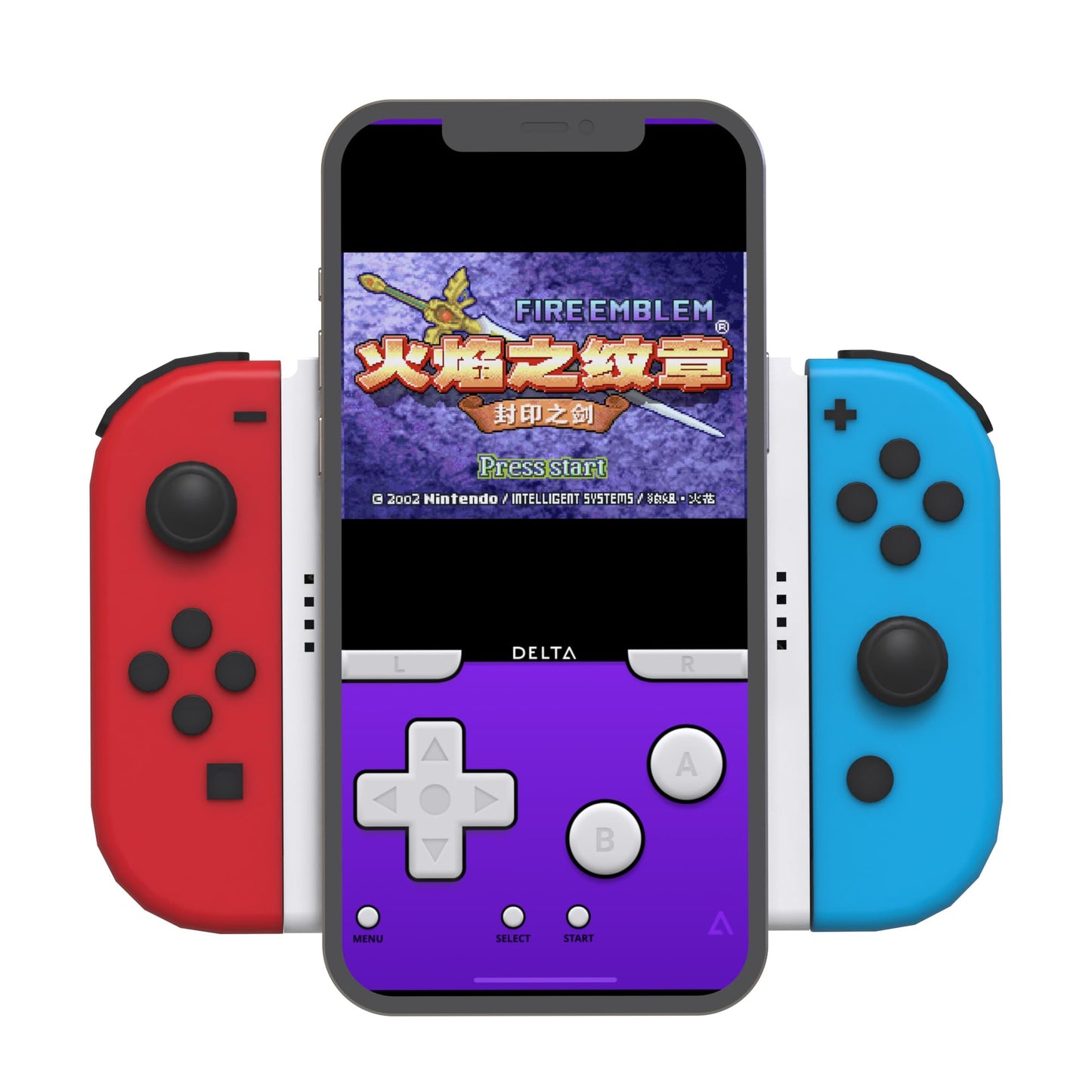
Description
Frequently Asked Questions
- Q: What is the color of the TEGRUP Charger Grip? A: The TEGRUP Charger Grip is white. This sleek color option complements the design of your gaming setup.
- Q: What are the dimensions of the TEGRUP Charger Grip? A: The specific dimensions are not provided. However, it is designed to fit Joy-Con controllers securely and accommodate various smartphones.
- Q: Does the TEGRUP Charger Grip have a charging capability? A: Yes, it can charge Joy-Con controllers. It features a top type-C interface for efficient charging.
- Q: Is the TEGRUP Charger Grip compatible with third-party controllers? A: Yes, it is compatible with third-party controllers and charging heads. This versatility enhances its utility for gamers.
- Q: How do I switch between horizontal and vertical modes? A: You can easily switch from horizontal to vertical modes. The design allows for quick adjustments without any tools.
- Q: Is the TEGRUP Charger Grip easy to install? A: Yes, installation is straightforward. Simply attach your Joy-Con controllers and secure your smartphone in the magnetic mount.
- Q: Can I use the TEGRUP Charger Grip while streaming? A: Yes, it's excellent for streaming. The design supports both horizontal and vertical orientations, perfect for gameplay and streaming.
- Q: How do I maintain the TEGRUP Charger Grip? A: To keep it in good condition, wipe it with a soft, dry cloth. Avoid using harsh chemicals to prevent damage to the material.
- Q: What precautions should I take with the TEGRUP Charger Grip? A: Ensure that the Joy-Con controllers are securely attached before use. Avoid overloading the magnetic mount with heavy devices.
- Q: How do I store the TEGRUP Charger Grip? A: Store it in a cool, dry place away from direct sunlight. Ensure all components are disassembled for compact storage.
- Q: Is there a warranty for the TEGRUP Charger Grip? A: Yes, it typically comes with a manufacturer warranty. Check the packaging for specific details regarding the warranty period.
- Q: What if the TEGRUP Charger Grip arrives damaged? A: If it arrives damaged, contact customer support immediately. They will guide you through the return or replacement process.
- Q: How do I troubleshoot charging issues with the TEGRUP Charger Grip? A: If charging fails, check the type-C cable connection. Ensure the cable and power source are functioning properly.
- Q: Is the TEGRUP Charger Grip suitable for all smartphones? A: It is compatible with many smartphones, but check the size specifications. It accommodates larger smartphones and compact tablets.
- Q: Can I play games while charging my Joy-Con controllers? A: Yes, you can play while charging. The design allows for seamless gaming without interruptions.