


RedThunder K20 TKL Wireless Keyboard & Mouse Combo, RGB Backlit, Compact, Black, Rechargeable
RedThunder K20 TKL Wireless Keyboard & Mouse Combo, RGB Backlit, Compact, Black, Rechargeable
Out of stock
Couldn't load pickup availability
Guarantee safe checkout

Sold by Gamex24, an authorized reseller.
Returns accepted within 30 days | support@gamex24.com
Shipping Information
- Free Standard Shipping — United States only
- Processing Time: 1–3 business days
- Estimated Delivery: 3–5 business days after dispatch
- Securely packed to ensure your purchase arrives in perfect condition
- Tracking number sent via email once dispatched
- Orders over $250 require signature upon delivery. Taxes calculated at checkout.
Returns & Refund
Returns accepted within 30 days of delivery.
Damaged or Defective Item
Free return shipping + replacement or full refund
Wrong Item Received
Free return shipping + replacement or full refund
Change of Mind
Return shipping at customer's expense · Item must be unused & in original packaging
Safety & Compliance
California Proposition 65 Warning
Some products sold on this website may expose you to chemicals known to the State of California to cause cancer, birth defects, or other reproductive harm.
www.P65Warnings.ca.govGeneral Product Safety Advisory
Always read the product label, instructions, and safety warnings before use. Do not use damaged or modified products. Store products in appropriate conditions as specified by the manufacturer.
Keep all products out of reach of children unless specifically designed for their use.
Product Authenticity & Notice
All products sold by Gamex24 are 100% authentic, sourced directly from authorized brand distributors. Product colors and dimensions may vary slightly from images due to screen calibration and manufacturing tolerances.
Gamex24 — Play. Compete. Repeat.


Description
Frequently Asked Questions
- Q: What are the dimensions of the RedThunder K20 keyboard and mouse combo? A: The dimensions are fourteen point seventeen inches long, six point seventy-seven inches wide, and one point eighteen inches high. This compact size makes it perfect for a tidy workspace.
- Q: What type of wireless technology does the RedThunder K20 use? A: It uses high-performance two point four G wireless technology. This ensures a stable connection between the keyboard, mouse, and your PC or laptop.
- Q: How long does the battery last for the RedThunder K20? A: The battery lasts for up to eight hours with backlighting on. It also features smart energy-saving functions that put it to sleep after one to three minutes of inactivity.
- Q: How do I connect the RedThunder K20 keyboard and mouse to my device? A: Simply plug in the USB receiver and turn on both the keyboard and mouse. They are pre-paired, making setup quick and easy.
- Q: Can I use the RedThunder K20 with a Mac? A: Yes, it is compatible with limited Mac OS support. However, multimedia keys may not function fully on the Mac system.
- Q: What multimedia features does the RedThunder K20 offer? A: It features six dedicated multimedia keys for easy access to functions like volume control and music playback. This enhances your overall user experience.
- Q: Is the RedThunder K20 ergonomic? A: Yes, it has a small slope design that supports the wrist and reduces fatigue. The mouse is also designed to fit the palm comfortably.
- Q: How do I clean the RedThunder K20 keyboard and mouse? A: To clean, gently wipe the surfaces with a damp cloth. Avoid using harsh chemicals that could damage the finish or functionality.
- Q: What should I do if my RedThunder K20 stops responding? A: First, check the battery level and recharge if necessary. If it still doesn't respond, try resetting the USB receiver or re-pairing the devices.
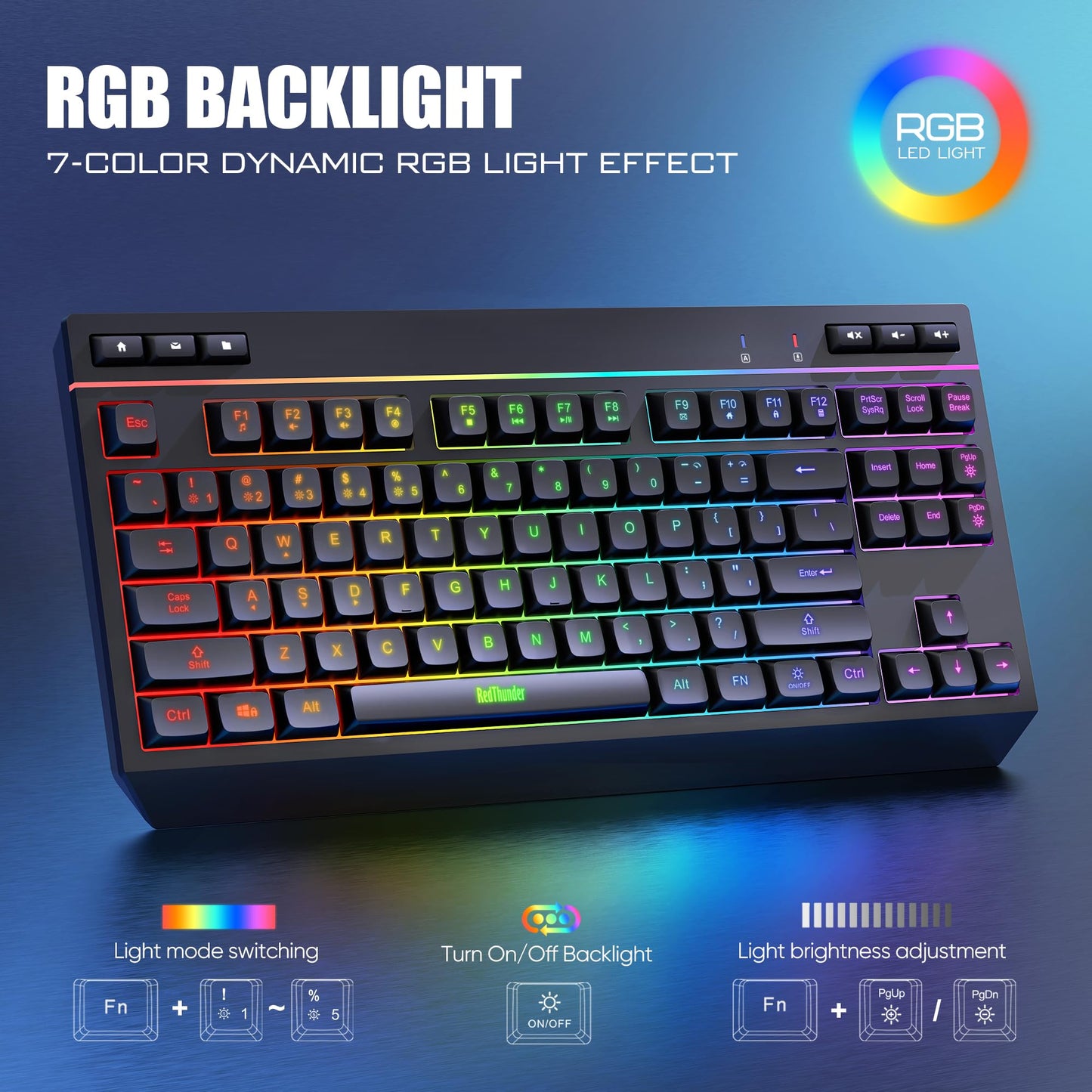
- Q: What lighting options are available for the RedThunder K20? A: It features four dynamic backlight effects, seven RGB monochrome options, and one RGB rainbow mode. You can also turn off the lighting to save battery.
- Q: What is the keystroke lifespan of the RedThunder K20 keyboard? A: The keyboard has a keystroke lifespan of ten million keystrokes. This durability makes it a long-lasting choice for gamers and typists alike.
- Q: Does the RedThunder K20 come with a warranty? A: Yes, it typically comes with a manufacturer warranty. Check the included documentation for specific warranty details and duration.
- Q: Can I use the RedThunder K20 while it's charging? A: No, the mouse operates in wired mode while charging. You can continue using the keyboard wirelessly.
- Q: Is the RedThunder K20 compatible with gaming consoles? A: It is primarily designed for PC and laptop use, with limited compatibility for gaming consoles. Check specific console requirements before use.
- Q: What materials are used in the RedThunder K20 design? A: The keyboard features ABS plastic for durability and transparent keycaps for visibility. This construction ensures a sleek and modern appearance.