


OIVO PS5 Horizontal Stand with Cooling Fan & Controller Charger, White, Model IV-P5257-JP
OIVO PS5 Horizontal Stand with Cooling Fan & Controller Charger, White, Model IV-P5257-JP
Regular price
$48.09
Regular price
$48.09
Sale price
$48.09
Low stock: 10 left
Quantity
Couldn't load pickup availability
Guarantee safe checkout

Shipping Information
Shipping Information
- Processing time : 1-3 days
- US Orders Ships in : 3-5 days
- International Orders Ships in : 8-12 days
- 15-days return on defective items
For more info go to Shipping Info page
Safety & Compliance
Safety & Compliance
⚠️ WARNING (California Proposition 65):
This product may contain chemicals known to the State of California to cause cancer, birth defects, or other reproductive harm.
For more information, please visit www.P65Warnings.ca.gov.


Description
Frequently Asked Questions
- Q: Is the Oivo PS5 Horizontal Stand compatible with both the PS5 Disc and Digital Editions? A: Yes, the Oivo PS5 Horizontal Stand is designed to accommodate both the PS5 Disc and Digital Editions, ensuring stable placement and improved ventilation.
- Q: How long does it take to charge the PS5 controllers using this stand? A: The Oivo PS5 Horizontal Stand features dual controller charging docks that can charge two PS5 controllers in approximately three to three and a half hours.
- Q: Does the Oivo PS5 stand come with a cooling fan? A: Yes, the stand includes two built-in silent cooling fans that operate at a speed of four thousand RPM, providing effective cooling for the PS5 console.
- Q: Can the cooling fans be turned off? A: Yes, the cooling fans on the Oivo PS5 Horizontal Stand can be turned on or off using a switch located on the side of the stand.
- Q: What materials are used in the construction of the Oivo PS5 stand? A: The Oivo PS5 Horizontal Stand is made from Ethylene Vinyl Acetate, ensuring durability and stability during use.
- Q: How stable is the Oivo PS5 Horizontal Stand? A: The stand features an upgraded screw-fixing design and anti-skid pads, enhancing the stability of the PS5 console and preventing accidental tipping.
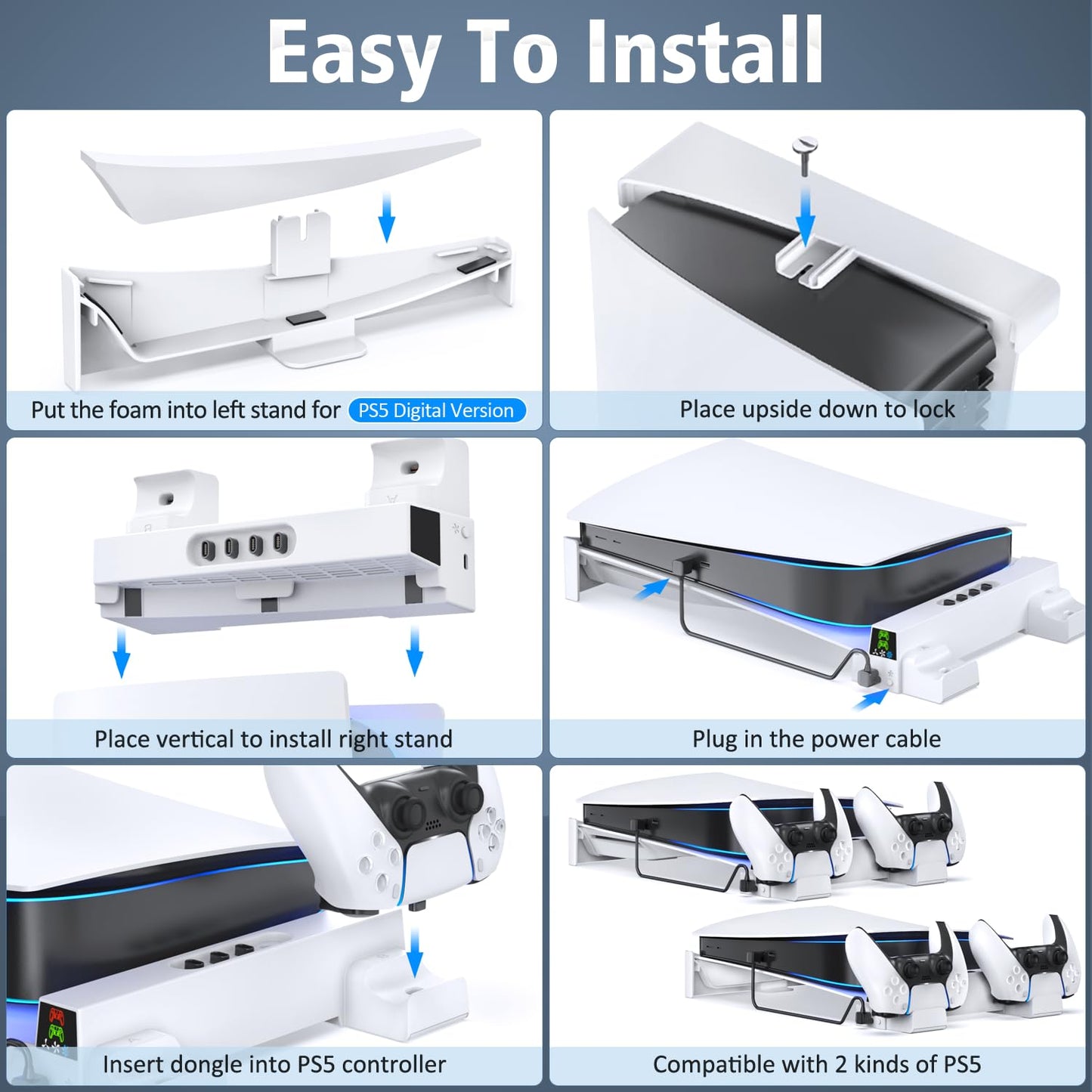
- Q: Is installation of the Oivo PS5 stand easy? A: Yes, the Oivo PS5 Horizontal Stand allows for easy and fast installation, with clear instructions for securing the console and connecting it to the charging stations.
- Q: What color options are available for the Oivo PS5 Horizontal Stand? A: The Oivo PS5 Horizontal Stand is available in a sleek white color, designed to complement the PS5 console.
- Q: Does the stand provide any additional USB ports? A: Yes, the stand comes equipped with four USB charging dongles, allowing for convenient charging of additional devices.
- Q: How does the LED indicator work on the charging docks? A: The LED indicators on the Oivo PS5 Horizontal Stand show the charging status of the controllers: red indicates charging, while green shows that the controllers are charged or in standby mode.