


NexiGo PS5 Slim Cooling Fan - Silent, Adjustable Speed, Auto On/Off, USB 3.0, Efficient Cooling for PS5 Slim Disc/Digital (White)
NexiGo PS5 Slim Cooling Fan - Silent, Adjustable Speed, Auto On/Off, USB 3.0, Efficient Cooling for PS5 Slim Disc/Digital (White)
Regular price
$21.51
Regular price
$21.51
Sale price
$21.51
Low stock: 10 left
Quantity
Couldn't load pickup availability
Guarantee safe checkout

Shipping Information
Shipping Information
- Processing time : 1-3 days
- US Orders Ships in : 3-5 days
- International Orders Ships in : 8-12 days
- 15-days return on defective items
For more info go to Shipping Info page
Safety & Compliance
Safety & Compliance
⚠️ WARNING (California Proposition 65):
This product may contain chemicals known to the State of California to cause cancer, birth defects, or other reproductive harm.
For more information, please visit www.P65Warnings.ca.gov.


Description
Frequently Asked Questions
- Q: How does the NexiGo PS5 Slim Cooling Fan improve the performance of my console? A: The NexiGo PS5 Slim Cooling Fan features an efficient cooling system with three fans designed to dissipate excess heat from the PlayStation 5 Slim console. This helps enhance the console's longevity and performance by preventing overheating during extended gaming sessions.
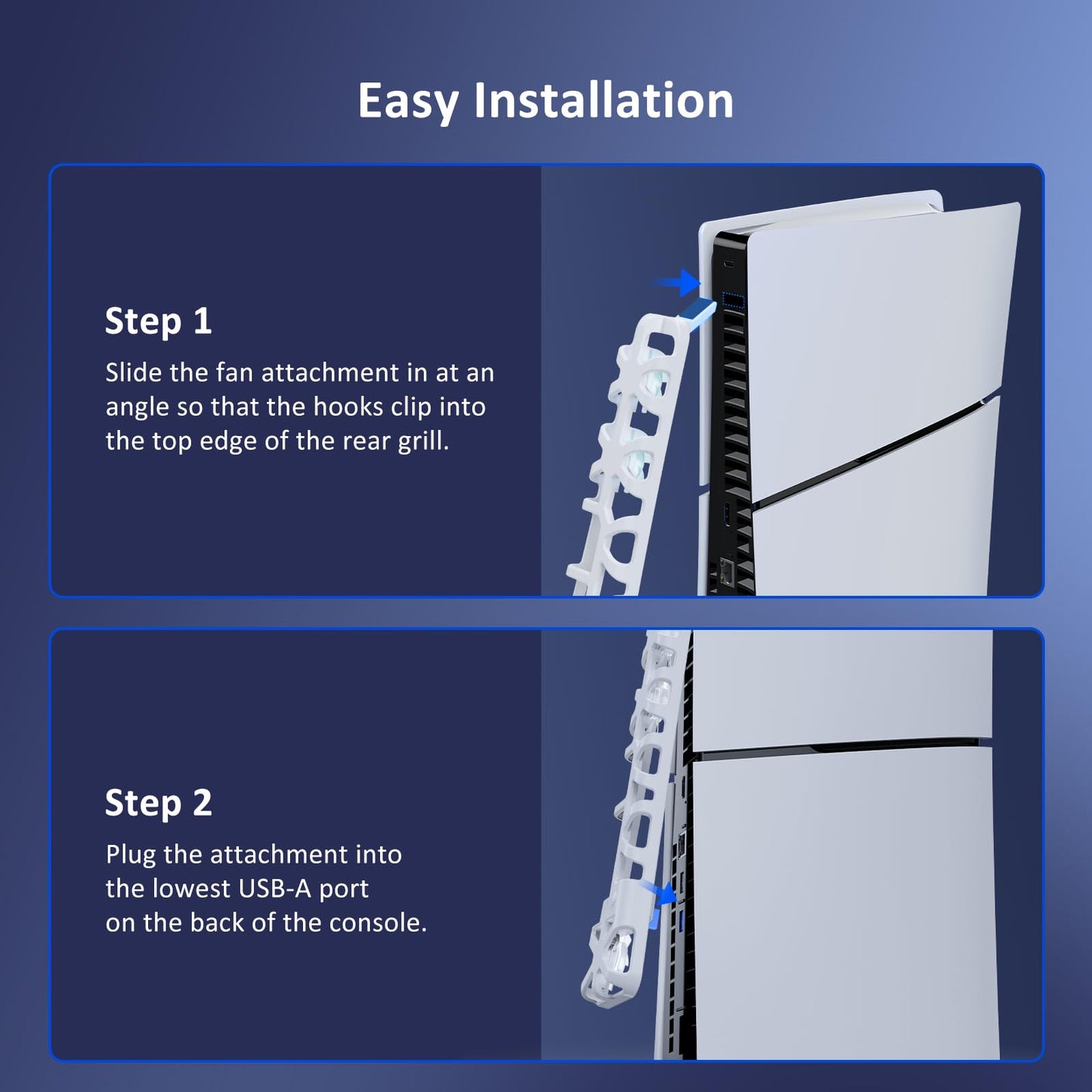
- Q: Is the NexiGo Cooling Fan easy to install? A: Yes, the NexiGo Cooling Fan is designed for plug-and-play functionality. It connects directly to one of the USB-A ports at the back of the console, making installation straightforward and user-friendly.
- Q: What features does the adjustable fan speed offer? A: The NexiGo Cooling Fan includes a three-level adjustable fan speed option. Users can easily switch between different fan speeds using a button located on the back of the fan attachment to ensure optimal cooling based on their gaming needs.
- Q: Can I still use my USB-A port while the cooling fan is connected? A: Yes, the NexiGo Cooling Fan includes a USB 3.0 port that allows you to continue using the USB-A port on your console for accessing external drives, high-speed data transfers, or charging other devices while the fan is connected.
- Q: Is the cooling fan compatible with both PS5 Slim Disc and Digital Editions? A: Yes, the NexiGo Cooling Fan is compatible with both the PlayStation 5 Slim Disc and Digital Editions, supporting both vertical and horizontal orientations for flexible use.
- Q: Does the cooling fan turn off automatically? A: Yes, the NexiGo Cooling Fan has an automatic power on/off feature that allows it to turn off when the console is powered down, minimizing energy wastage when not in use.
- Q: What color options are available for the NexiGo Cooling Fan? A: The NexiGo PS5 Slim Cooling Fan is available in a sleek white color that complements the design of the PlayStation 5 Slim console.
- Q: What is the size of the cooling fan? A: The NexiGo Cooling Fan is specifically designed for the PS5 Slim console, ensuring a perfect fit and optimal performance for that model.
- Q: Are there any maintenance requirements for the cooling fan? A: Generally, the NexiGo Cooling Fan requires minimal maintenance. However, it is advisable to periodically clean the fan's exterior and ensure that the air vents are free from dust and obstructions to maintain optimal airflow.
- Q: What should I do if the cooling fan is not functioning properly? A: If the NexiGo Cooling Fan is not functioning properly, first ensure that it is securely connected to the USB-A port. If issues persist, try using a different USB port or check for any visible obstructions. If problems continue, consult the user manual for troubleshooting or reach out to customer support for assistance.