


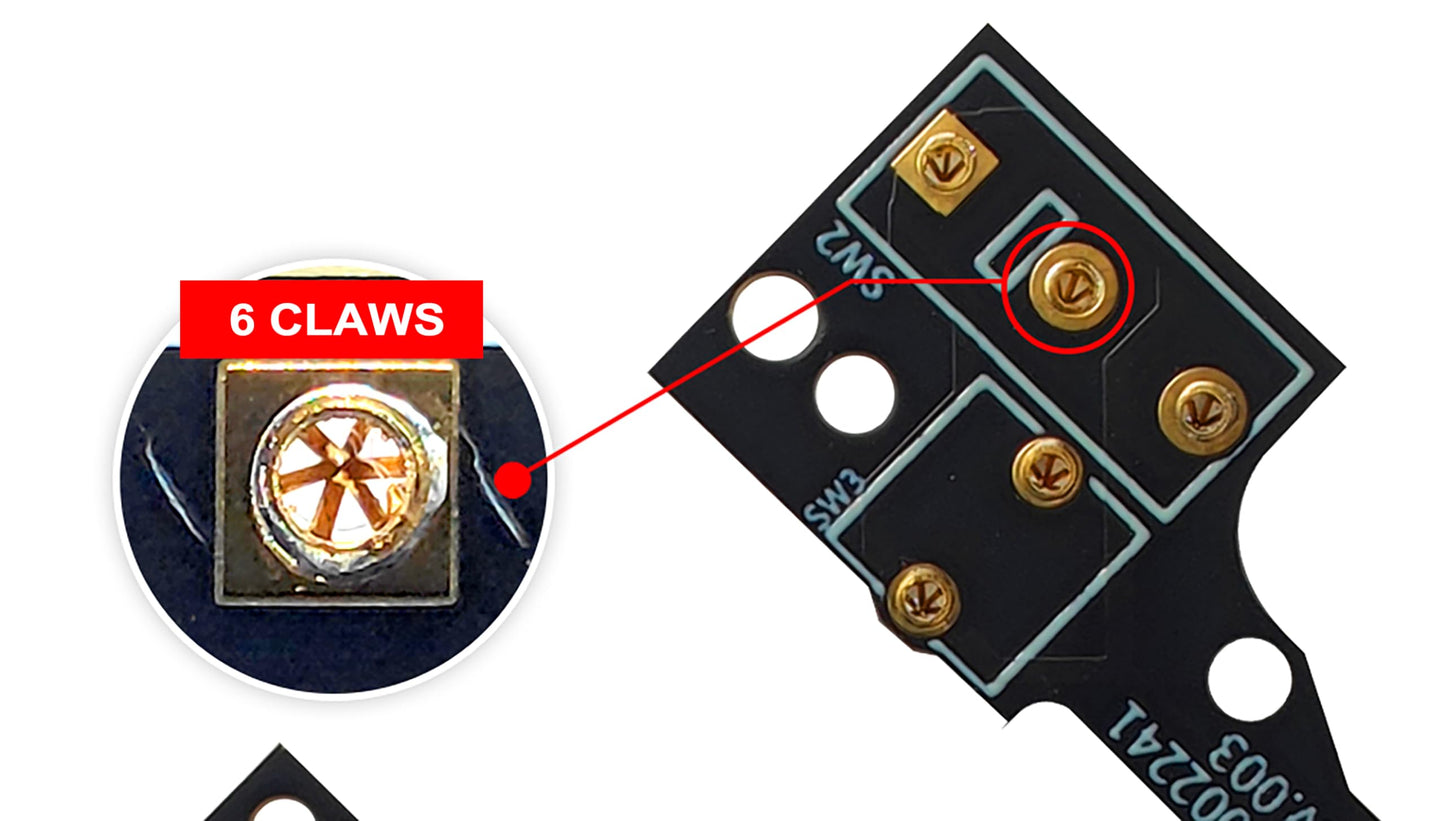
Hokeyio Hot-Swap Micro Switch PCB Kit for Logitech G Pro X Superlight - ENIG Gold Pads, 6-Claw Clamps, Fix Double-Click, GPX Color
Hokeyio Hot-Swap Micro Switch PCB Kit for Logitech G Pro X Superlight - ENIG Gold Pads, 6-Claw Clamps, Fix Double-Click, GPX Color
Out of stock
Couldn't load pickup availability
Guarantee safe checkout

Sold by Gamex24, an authorized reseller.
Returns accepted within 30 days | support@gamex24.com
Shipping Information
- Free Standard Shipping — United States only
- Processing Time: 1–3 business days
- Estimated Delivery: 3–5 business days after dispatch
- Securely packed to ensure your purchase arrives in perfect condition
- Tracking number sent via email once dispatched
- Orders over $250 require signature upon delivery. Taxes calculated at checkout.
Returns & Refund
Returns accepted within 30 days of delivery.
Damaged or Defective Item
Free return shipping + replacement or full refund
Wrong Item Received
Free return shipping + replacement or full refund
Change of Mind
Return shipping at customer's expense · Item must be unused & in original packaging
Safety & Compliance
California Proposition 65 Warning
Some products sold on this website may expose you to chemicals known to the State of California to cause cancer, birth defects, or other reproductive harm.
www.P65Warnings.ca.govGeneral Product Safety Advisory
Always read the product label, instructions, and safety warnings before use. Do not use damaged or modified products. Store products in appropriate conditions as specified by the manufacturer.
Keep all products out of reach of children unless specifically designed for their use.
Product Authenticity & Notice
All products sold by Gamex24 are 100% authentic, sourced directly from authorized brand distributors. Product colors and dimensions may vary slightly from images due to screen calibration and manufacturing tolerances.
Gamex24 — Play. Compete. Repeat.


Description
Frequently Asked Questions
- Q: What materials are used in the Hokeyio Hot-Swap Micro Switch PCB Kit? A: The kit features ENIG gold pads and a hot-swappable PCB plate. These materials ensure durability and prevent oxidation for long-lasting performance.
- Q: What size switches are compatible with this PCB kit? A: This kit is compatible with three switch sizes: thick pins for Omron, thin pins for Huano/Kailh, and medium pins for TTC. This versatility allows users to customize their mouse's click feel.
- Q: How many components are included in the kit? A: The kit includes five components: one hot-swappable PCB plate, one TTC dust-proof gold encoder, one Kaihua middle key micro switch, one set of mouse feet, and one magnetic screwdriver.
- Q: How do I install the Hokeyio Hot-Swap PCB Kit? A: Installation is straightforward and requires no soldering. Simply follow the video guide included in the manual for a step-by-step process to replace your mouse switches.
- Q: Can I use any brand of micro switch with this kit? A: Yes, you can use any brand's micro switches, including Omron, Huano, Kailh, and TTC. This flexibility allows for a customized clicking experience based on personal preference.
- Q: Is this kit suitable for beginners to install? A: Yes, this kit is designed for easy installation and is suitable for beginners. No soldering skills are required, making it accessible for all users.
- Q: How do I keep the Hokeyio PCB Kit in good condition? A: To maintain the kit, avoid exposing it to moisture and clean any dust gently. Store it in a cool, dry place when not in use to ensure its longevity.
- Q: Are there any special cleaning instructions for this kit? A: No specific cleaning instructions are required for the PCB kit itself. However, avoid using harsh chemicals and wipe it down with a soft, dry cloth to remove dust.
- Q: What should I do if I encounter issues during installation? A: If you experience issues during installation, refer to the video guide in the manual. You can also contact Hokeyio's customer support for further assistance.
- Q: Is there a warranty for the Hokeyio Hot-Swap PCB Kit? A: Yes, the Hokeyio Hot-Swap PCB Kit typically comes with a warranty. Check the packaging or the manufacturer's website for specific warranty details.
- Q: How does this kit compare to other micro switch kits? A: This kit offers universal compatibility with various switch brands and a no-soldering installation process, setting it apart from many other kits that may require soldering.
- Q: Is this kit suitable for professional gamers? A: Yes, this kit is designed for gamers, providing customization options and quick installation to enhance gaming performance and experience.
- Q: What are the benefits of using ENIG gold pads? A: ENIG gold pads resist corrosion and oxidation, which ensures better conductivity and longer-lasting performance for your mouse's switches.
- Q: Can I customize the click feel of my mouse with this kit? A: Yes, you can customize the click feel by choosing different brands of micro switches. This allows you to tailor the mouse's response to your gaming style.
- Q: Does the kit come with a guide for installation? A: Yes, the kit includes a video guide in the manual for easy installation, ensuring that users can complete the process without issues.
- Q: What is the expected lifespan of the components in this kit? A: The components in the Hokeyio kit are designed for durability, with a lifespan that can vary based on the usage of the micro switches chosen.