


HK Gaming GK61 Mechanical Gaming Keyboard - 61 Keys RGB Backlit, Gateron Optical Silver, Red for PC/Mac Gamers
HK Gaming GK61 Mechanical Gaming Keyboard - 61 Keys RGB Backlit, Gateron Optical Silver, Red for PC/Mac Gamers
Out of stock
Couldn't load pickup availability
Guarantee safe checkout

Sold by Gamex24, an authorized reseller.
Returns accepted within 30 days | support@gamex24.com
Shipping Information
- Free Standard Shipping — United States only
- Processing Time: 1–3 business days
- Estimated Delivery: 3–5 business days after dispatch
- Securely packed to ensure your purchase arrives in perfect condition
- Tracking number sent via email once dispatched
- Orders over $250 require signature upon delivery. Taxes calculated at checkout.
Returns & Refund
Returns accepted within 30 days of delivery.
Damaged or Defective Item
Free return shipping + replacement or full refund
Wrong Item Received
Free return shipping + replacement or full refund
Change of Mind
Return shipping at customer's expense · Item must be unused & in original packaging
Safety & Compliance
California Proposition 65 Warning
Some products sold on this website may expose you to chemicals known to the State of California to cause cancer, birth defects, or other reproductive harm.
www.P65Warnings.ca.govGeneral Product Safety Advisory
Always read the product label, instructions, and safety warnings before use. Do not use damaged or modified products. Store products in appropriate conditions as specified by the manufacturer.
Keep all products out of reach of children unless specifically designed for their use.
Product Authenticity & Notice
All products sold by Gamex24 are 100% authentic, sourced directly from authorized brand distributors. Product colors and dimensions may vary slightly from images due to screen calibration and manufacturing tolerances.
Gamex24 — Play. Compete. Repeat.


Description
Frequently Asked Questions
- Q: What are the dimensions of the HK GAMING GK61 Mechanical Gaming Keyboard? A: The keyboard measures eleven point five inches in length, four point zero two inches in width, and one point five seven inches in height.
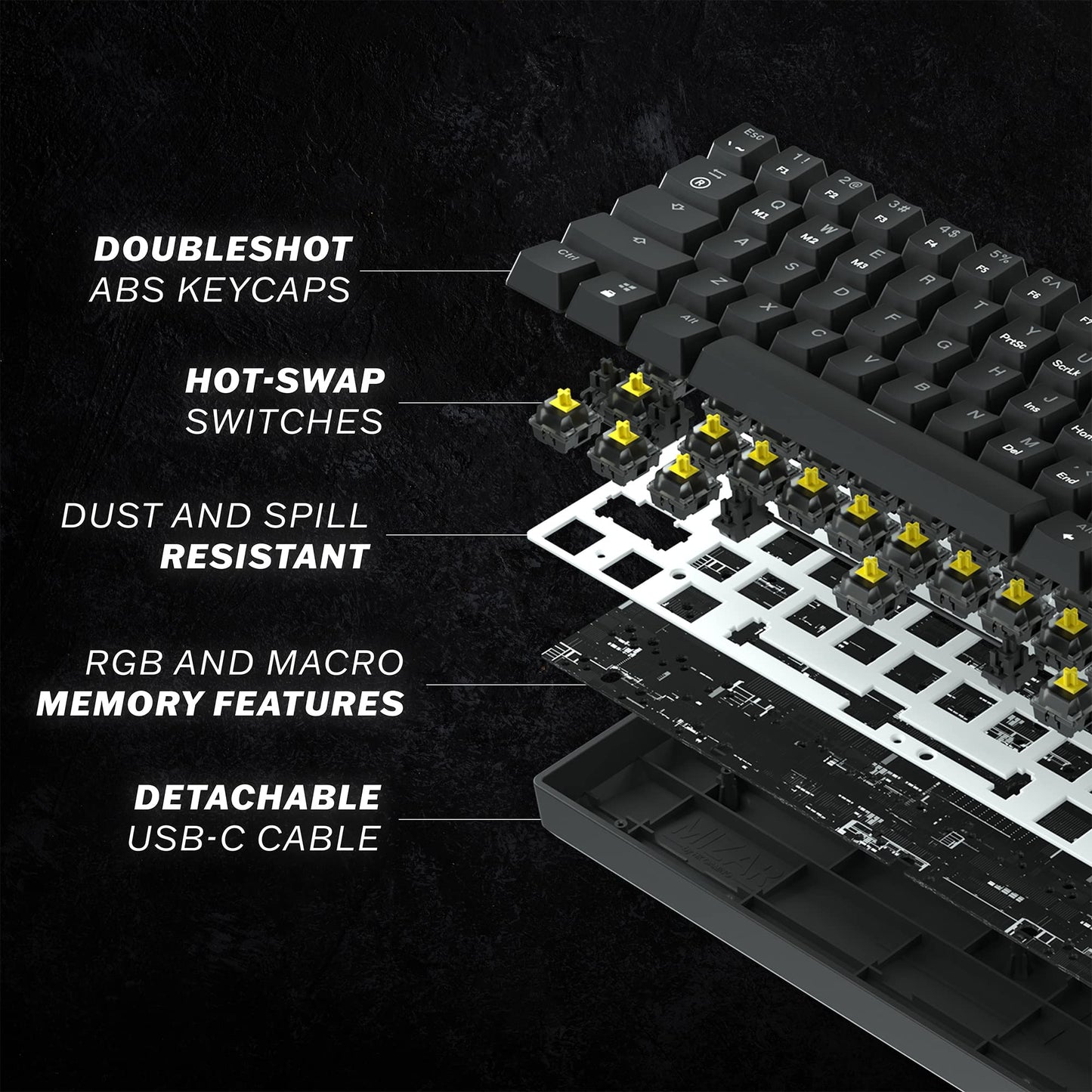
- Q: What type of switches are used in the GK61 keyboard? A: The GK61 uses Gateron Optical Silver switches, which are known for their durability and fast response time.
- Q: What material is the HK GAMING GK61 keyboard made of? A: The keyboard is made from Acrylonitrile Butadiene Styrene, which is a strong and durable plastic.
- Q: How do I connect the GK61 keyboard to my computer? A: You can connect the GK61 keyboard using the provided USB-C cable, which is detachable for easy portability.
- Q: Is the GK61 keyboard suitable for Mac users? A: Yes, the GK61 keyboard is compatible with both PC and Mac systems.
- Q: How do I customize the RGB lighting on the GK61 keyboard? A: You can customize the RGB lighting through the keyboard's programmable software, allowing you to set different colors and effects.
- Q: How do I clean the GK61 keyboard? A: To clean the GK61 keyboard, use a soft cloth and mild cleaning solution. Avoid using excessive moisture.
- Q: Can I replace the switches on the GK61 keyboard? A: Yes, the GK61 keyboard allows for switch replacement, enabling you to customize your typing experience.
- Q: What is the response time of the optical switches? A: The optical switches in the GK61 keyboard have an incredibly fast response time of zero point two milliseconds.
- Q: How should I store the GK61 keyboard? A: Store the GK61 keyboard in a cool, dry place and avoid exposing it to extreme temperatures or moisture.
- Q: Does the GK61 keyboard come with a warranty? A: Yes, the GK61 keyboard typically comes with a manufacturer's warranty, covering defects in materials and workmanship.
- Q: What accessories are included with the GK61 keyboard? A: The GK61 keyboard comes with a USB-C cable, a plastic keycap puller, and a switch puller.
- Q: Is the GK61 keyboard suitable for gaming? A: Yes, the GK61 keyboard is designed with gamers in mind, featuring fast optical switches and customizable RGB lighting.
- Q: What is the actuation point of the switches? A: The actuation point of the Gateron Optical Silver switches is one point five millimeters, allowing for quick responses.
- Q: Can I use the GK61 keyboard for typing as well as gaming? A: Yes, the GK61 keyboard is versatile and suitable for both typing and gaming due to its responsive switches.