Skip to product information
1 of 1

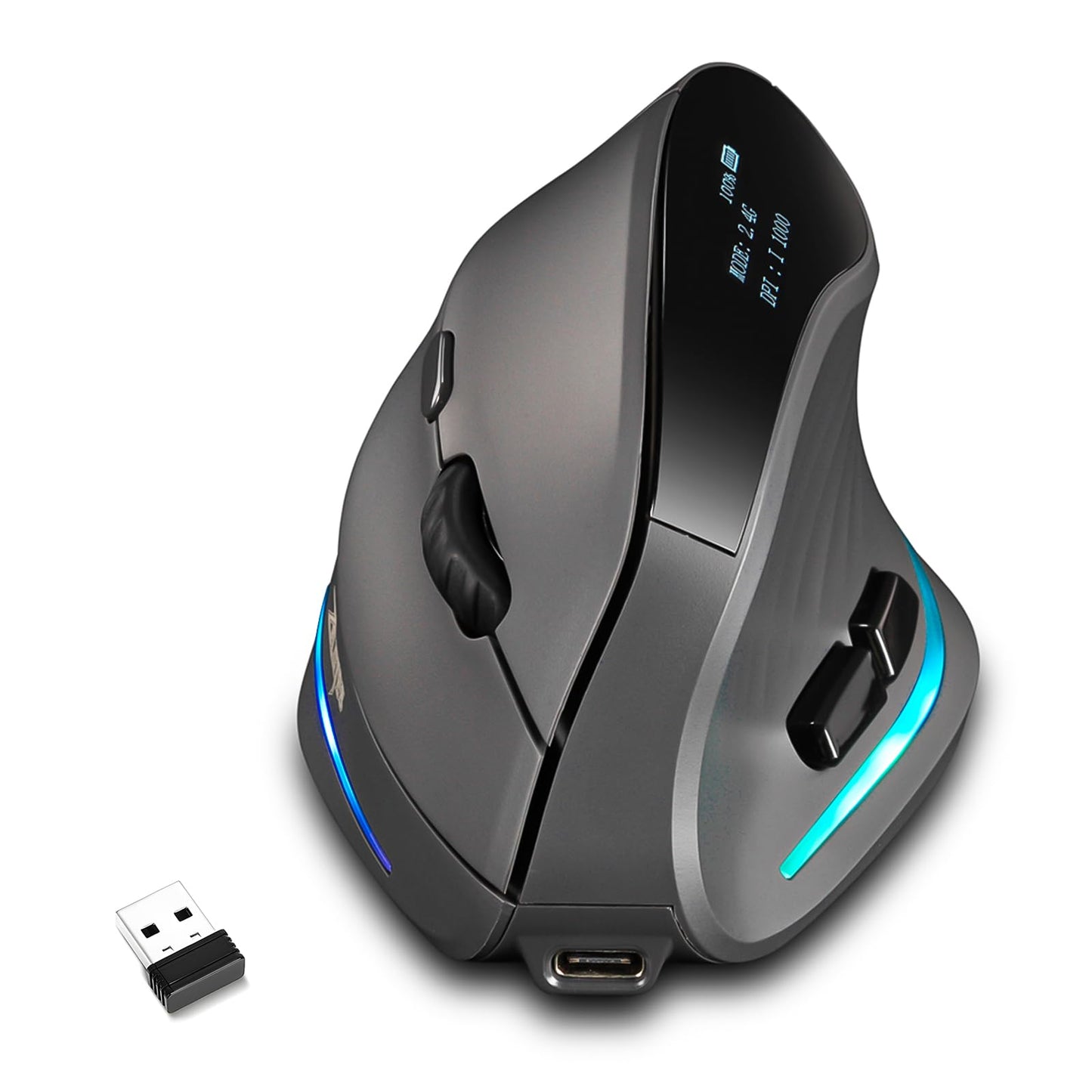
Attoe Gaming Mouse with Display Wireless Vertical Ergonomic Mouse with Tri-Mode Connectivity 7 Programmable RGB Buttons 4000 DPI Rechargeable for PC Laptop Mac

Attoe Gaming Mouse with Display Wireless Vertical Ergonomic Mouse with Tri-Mode Connectivity 7 Programmable RGB Buttons 4000 DPI Rechargeable for PC Laptop Mac

Regular price $41.73
Regular price $45.90 Sale price $41.73
Sale Sold out
Shipping calculated at checkout.
SKU: WBGMXB0FXM2HQ65
Brand: Attoe

Out of stock

Quantity

Guarantee safe checkout

Payment Methods - Visa, Mastercard, PayPal, etc.

Sold by Gamex24, an authorized reseller.

Returns accepted within 30 days  |  support@gamex24.com

✓ Verified
Shipping Information
  • Free Standard Shipping — United States only
  • Processing Time: 1–3 business days
  • Estimated Delivery: 3–5 business days after dispatch
  • Securely packed to ensure your purchase arrives in perfect condition
  • Tracking number sent via email once dispatched
  • Orders over $250 require signature upon delivery. Taxes calculated at checkout.
Returns & Refund

Returns accepted within 30 days of delivery.

Damaged or Defective Item

Free return shipping + replacement or full refund

Wrong Item Received

Free return shipping + replacement or full refund

Change of Mind

Return shipping at customer's expense · Item must be unused & in original packaging

All returns require a Return Authorization (RA) number before sending.

To initiate a return, contact us:

support@gamex24.com +1 832-402-9851
View Full Return & Refund Policy
Safety & Compliance
⚠️

California Proposition 65 Warning

Some products sold on this website may expose you to chemicals known to the State of California to cause cancer, birth defects, or other reproductive harm.

www.P65Warnings.ca.gov
🛒

General Product Safety Advisory

Always read the product label, instructions, and safety warnings before use. Do not use damaged or modified products. Store products in appropriate conditions as specified by the manufacturer.

Keep all products out of reach of children unless specifically designed for their use.

ℹ️

Product Authenticity & Notice

All products sold by Gamex24 are 100% authentic, sourced directly from authorized brand distributors. Product colors and dimensions may vary slightly from images due to screen calibration and manufacturing tolerances.

Gamex24 — Play. Compete. Repeat.
View full details

Description

Elevate Your Game and Comfort: The All-in-One Vertical Gaming Mouse with OLED Display Meet the ultimate fusion of ergonomic comfort and gaming performance.  Our vertical mouse is scientifically engineered to transform how you interact with your computer.  By promoting a natural 57-degree handshake posture it significantly reduces strain on your wrist forearm   and shoulder effectively combating carpal tunnel syndrome and muscle fatigue during marathon sessions.  Whether youre dominating the battlefield closing a critical deal or browsing the web   this mouse ensures you do it in unparalleled comfort and control. Specifications & Package Contents: Product Dimensions: 11 x 7.2 x 7.5 cm / 4.3 x 2.8 x 2.9 inch Product Weight: 115 g / 0.25 lb Color: Gray Number of Buttons: 7 Tracking System: Optical DPI Settings: 1000 1600 2400 3200 4000 (5 adjustable levels) Polling Rate: 125 / 250 / 500 / 1000 Hz (2.4G Mode) / 133 Hz (Bluetooth Mode) Battery Capacity: 800mAh Li-ion Connection Modes: 2.4GHz Wireless Bluetooth 5.0/3.0 USB-C Wired Wireless Range: = 10 meters / 33 feet Cable Length: 1.5 meters / 4.9 feet Switch Lifespan: 5 million clicks Scroll Wheel Lifespan: 1.2 million rotations Compatibility: Windows 11/10/8/7 macOS Chrome OS Linux Android Package Includes: Vertical Ergonomic Mouse x 1 USB-C Charging/Data Cable x 1 2.4 GHz USB Receiver x 1 User Manual x 1 Troubleshooting & Connection Guide For 2.4G Connection: Ensure the mouse is switched to 2.4G mode.  Long-press the Bluetooth/Mode switch at the bottom for over 3 seconds   then insert the receiver into your computers USB port.  Keep the mouse within 1 meter of the receiver during this initial pairing. For Bluetooth Connection:  Switch to Bluetooth mode. Long-press the mode switch for over 3 seconds to enter  pairing mode (visible for 2 minutes). Select our mouse from your devices Bluetooth list. The mouse isnt responding? Check that the power switch is turned ON. Connect the USB-C cable to charge the battery. Try plugging the 2.4G receiver into a different USB port. Reboot your computer and re-pair the connection following the steps above. Upgrade your computing experience with the mouse that doesnt force you  to choose Predictionween health and high performance.