


ASUS ROG Strix Flare RGB Mechanical Gaming Keyboard - Cherry MX Blue, Black, Standard Edition, Aura Sync, Customizable Badge, USB Pass-Through
ASUS ROG Strix Flare RGB Mechanical Gaming Keyboard - Cherry MX Blue, Black, Standard Edition, Aura Sync, Customizable Badge, USB Pass-Through
Out of stock
Couldn't load pickup availability
Guarantee safe checkout

Sold by Gamex24, an authorized reseller.
Returns accepted within 30 days | support@gamex24.com
Shipping Information
- Free Standard Shipping — United States only
- Processing Time: 1–3 business days
- Estimated Delivery: 3–5 business days after dispatch
- Securely packed to ensure your purchase arrives in perfect condition
- Tracking number sent via email once dispatched
- Orders over $250 require signature upon delivery. Taxes calculated at checkout.
Returns & Refund
Returns accepted within 30 days of delivery.
Damaged or Defective Item
Free return shipping + replacement or full refund
Wrong Item Received
Free return shipping + replacement or full refund
Change of Mind
Return shipping at customer's expense · Item must be unused & in original packaging
Safety & Compliance
California Proposition 65 Warning
Some products sold on this website may expose you to chemicals known to the State of California to cause cancer, birth defects, or other reproductive harm.
www.P65Warnings.ca.govGeneral Product Safety Advisory
Always read the product label, instructions, and safety warnings before use. Do not use damaged or modified products. Store products in appropriate conditions as specified by the manufacturer.
Keep all products out of reach of children unless specifically designed for their use.
Product Authenticity & Notice
All products sold by Gamex24 are 100% authentic, sourced directly from authorized brand distributors. Product colors and dimensions may vary slightly from images due to screen calibration and manufacturing tolerances.
Gamex24 — Play. Compete. Repeat.


Description
Frequently Asked Questions
- Q: What are the dimensions of the ASUS RGB Mechanical Gaming Keyboard? A: The ASUS RGB Mechanical Gaming Keyboard measures six point one inches in length, one point twenty-two inches in width, and seventeen point ninety-one inches in height.
- Q: What type of switches does the ROG Strix Flare use? A: The ROG Strix Flare uses Cherry MX Blue switches, known for their tactile feedback and faster response times, making them ideal for gaming.
- Q: Is the keyboard customizable in terms of lighting? A: Yes, the keyboard features ASUS Aura Sync, allowing users to customize RGB lighting effects across the entire color spectrum.
- Q: How do I set up the ASUS ROG Strix Flare for gaming? A: To set up the keyboard, connect it to your PC via USB, install the necessary drivers, and configure your preferred lighting and macro settings using the Aura Sync software.
- Q: Can I record macros on this keyboard? A: Yes, the ROG Strix Flare has on-the-fly macro recording capabilities, allowing you to create custom commands quickly during gameplay.
- Q: Is the ASUS RGB Mechanical Gaming Keyboard suitable for non-gamers? A: Yes, while it's designed for gamers, the customizable features and responsive keys make it suitable for general use, including typing and office work.
- Q: How do I clean the ROG Strix Flare keyboard? A: To clean the keyboard, unplug it, use a soft cloth to wipe the surface, and avoid using harsh chemicals that could damage the keys.
- Q: Does this keyboard come with a detachable wrist rest? A: Yes, the ROG Strix Flare includes a detachable wrist rest for added comfort during extended gaming sessions.
- Q: What is the warranty period for this keyboard? A: The ASUS ROG Strix Flare typically comes with a one-year warranty, covering manufacturing defects and hardware issues.
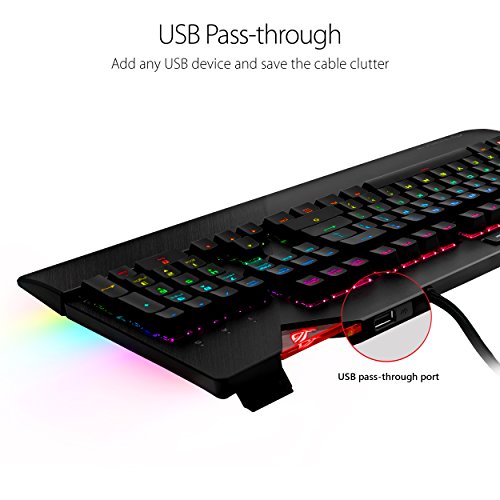
- Q: How does the ASUS RGB Mechanical Gaming Keyboard compare to others? A: Compared to other gaming keyboards, the ROG Strix Flare offers unique features like customizable badges, USB pass-through, and superior Cherry MX Blue switches for enhanced performance.
- Q: What if my keyboard arrives damaged? A: If your keyboard arrives damaged, you should contact the seller for a return or replacement within the warranty period.
- Q: Is the ASUS ROG Strix Flare compatible with all PCs? A: Yes, the keyboard is compatible with any PC that has a USB port, making it versatile for various setups.
- Q: Can I use this keyboard for programming? A: Yes, the ROG Strix Flare is well-suited for programming due to its tactile feedback and customizable features that enhance typing efficiency.
- Q: Does the keyboard feature anti-ghosting technology? A: Yes, the ROG Strix Flare provides one hundred percent anti-ghosting, ensuring multiple key presses are accurately registered during gameplay.
- Q: Is there a way to personalize the keyboard's logo? A: Yes, you can personalize the keyboard's logo with the included black acrylic badge, which lights up with Aura Sync when inserted.
- Q: What media controls are available on this keyboard? A: The keyboard features dedicated media controls, including instant media keys and a smooth-scrolling volume wheel for easy audio management.