


8Bitdo Pro 2 Bluetooth Controller - Hall Effect Joysticks, 2 Back Paddles, Wireless for Switch, PC, Android & Steam Deck - Black Edition
8Bitdo Pro 2 Bluetooth Controller - Hall Effect Joysticks, 2 Back Paddles, Wireless for Switch, PC, Android & Steam Deck - Black Edition
Out of stock
Couldn't load pickup availability
Guarantee safe checkout

Sold by Gamex24, an authorized reseller.
Returns accepted within 30 days | support@gamex24.com
Shipping Information
- Free Standard Shipping — United States only
- Processing Time: 1–3 business days
- Estimated Delivery: 3–5 business days after dispatch
- Securely packed to ensure your purchase arrives in perfect condition
- Tracking number sent via email once dispatched
- Orders over $250 require signature upon delivery. Taxes calculated at checkout.
Returns & Refund
Returns accepted within 30 days of delivery.
Damaged or Defective Item
Free return shipping + replacement or full refund
Wrong Item Received
Free return shipping + replacement or full refund
Change of Mind
Return shipping at customer's expense · Item must be unused & in original packaging
Safety & Compliance
California Proposition 65 Warning
Some products sold on this website may expose you to chemicals known to the State of California to cause cancer, birth defects, or other reproductive harm.
www.P65Warnings.ca.govGeneral Product Safety Advisory
Always read the product label, instructions, and safety warnings before use. Do not use damaged or modified products. Store products in appropriate conditions as specified by the manufacturer.
Keep all products out of reach of children unless specifically designed for their use.
Product Authenticity & Notice
All products sold by Gamex24 are 100% authentic, sourced directly from authorized brand distributors. Product colors and dimensions may vary slightly from images due to screen calibration and manufacturing tolerances.
Gamex24 — Play. Compete. Repeat.


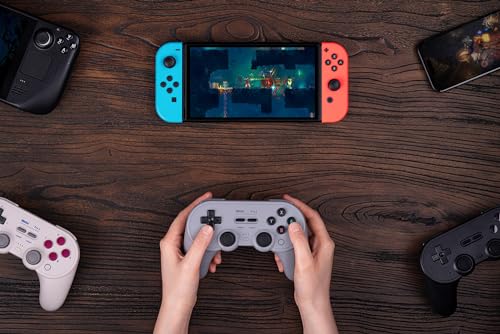
Description
Frequently Asked Questions
- Q: What is the model number of this controller? A: The model number is six nine two two six two one five zero five zero one. This unique identifier helps in product tracking and support.
- Q: What size are the joysticks on the 8BitDo Pro 2? A: The controller features Hall Effect joysticks, which provide precise control and longevity. They are specifically designed for a superior gaming experience.
- Q: What are the compatible devices for this controller? A: It is compatible with the Nintendo Switch, Windows PCs, Apple devices, Android, Steam Deck, and Raspberry Pi. This versatility allows for extensive use across platforms.
- Q: How do I connect the 8BitDo Pro 2 to my device? A: You connect it via Bluetooth, which allows for a seamless wireless experience. Ensure your device's Bluetooth is enabled for pairing.
- Q: Does this controller have customizable profiles? A: Yes, it features custom profile switching. This allows players to adjust settings for different games easily.
- Q: Can I use this controller for mobile gaming? A: Yes, it is compatible with Android and Apple devices. Enjoy gaming on the go with the wireless functionality.
- Q: How do I charge the 8BitDo Pro 2 controller? A: You charge it using a USB-C connection. The rechargeable battery lasts up to twenty hours on a full charge.
- Q: What safety materials are included in the controller? A: The controller contains lithium-ion batteries, which may pose safety risks if not handled properly. Follow usage guidelines to ensure safe operation.
- Q: Is there a warranty included with the purchase? A: Yes, it typically includes a warranty. Check the manufacturer's guidelines for specific warranty details and duration.
- Q: What should I do if my controller is not connecting? A: If it's not connecting, ensure Bluetooth is enabled on your device and that the controller is charged. Restarting both devices may also resolve the issue.
- Q: How do I clean the 8BitDo Pro 2 controller? A: To clean it, use a soft, dry cloth. Avoid harsh chemicals, especially on the joysticks and buttons to maintain their functionality.
- Q: What is the battery life of the 8BitDo Pro 2? A: The battery lasts up to twenty hours on a single charge. This allows for extended play sessions without frequent interruptions.
- Q: Can this controller be used for PC gaming? A: Yes, it is fully compatible with Windows PCs. It offers the same functionality as on consoles, enhancing your gaming experience.
- Q: Are there any back buttons on the controller? A: Yes, it has two pro-level back buttons. These enhance gameplay by allowing quicker access to in-game functions.
- Q: How do I update the firmware for the 8BitDo Pro 2? A: You can update the firmware through the ultimate software available for PC, Android, and iOS. Regular updates improve functionality and compatibility.
- Q: What features make this controller stand out? A: It features Hall Effect joysticks, customizable profiles, wireless Bluetooth connectivity, and motion controls. These enhancements provide a superior gaming experience.