

The Best PC Controllers With Paddles Right Now: What to Look for Before You Buy
Stop Lifting Your Thumb Off the Stick
If you've ever died in a firefight because you had to hit jump, reload, or crouch with a face button — pulling your right thumb off the analog stick for half a second — you already understand why back paddles exist. They move those actions to the back of the controller, where your middle or ring fingers sit doing nothing anyway. You keep both thumbs on the sticks, and your inputs get faster and cleaner without any extra effort.
That's the whole idea. But the controller market has turned "back paddles" into a marketing term slapped on everything from budget gamepads to expensive elite controllers, and not all implementations are equal. Before you spend money on one, it's worth knowing which features actually change how you play and which are just spec-sheet noise.
What Back Paddles Actually Do (and Don't Do)
Paddles are remappable buttons. On most controllers that have them, you can assign any existing button function — A, B, X, Y, bumpers, triggers — to the paddle on the back. That's it. They don't add new inputs the game doesn't already support; they just move existing ones somewhere your fingers can reach without breaking your grip.
Who benefits most? Honestly, more players than you'd expect. The obvious use case is competitive shooters — keeping your thumb on the right stick while you jump or slide is a real mechanical advantage. But paddle controllers are just as useful in action RPGs where you're dodging and attacking simultaneously, or in platformers where precise stick control and jumping need to happen at the same time.
Where paddles don't make a big difference: turn-based games, strategy titles, or anything where reaction speed isn't a factor. If your gaming is mostly slow-paced, the extra buttons won't change much.
The Features That Actually Matter
Joystick Technology: Hall Effect vs. Potentiometer
This is the one spec worth paying close attention to, and it's more important than the paddles themselves. Most controllers use potentiometer-based analog sticks — physical contacts that wear down over time and eventually cause stick drift, where your character moves or the camera creeps without you touching anything. It's a well-known problem across most major first-party controllers.
Hall Effect joysticks work differently. They use magnets to detect stick position rather than physical contact, so there's no wearing surface to degrade. The result is sticks that stay accurate much longer. If you're buying a controller you plan to use heavily for years, Hall Effect sticks are a meaningful long-term upgrade over standard potentiometers.
Both the 8Bitdo Pro 2 Black Edition and the 8Bitdo Pro 2 Gray Edition feature Hall Effect joysticks — which is notable at their price point, since this technology typically shows up on controllers that cost considerably more.
Number of Paddles
Two paddles is the practical sweet spot for most players. Four paddles (as found on some elite controllers) sounds better on paper, but the fourth and fifth fingers on each hand aren't naturally strong or precise, and many players end up only using two paddles consistently anyway. Two well-placed paddles you'll actually use beats four awkward ones you won't.
Both 8Bitdo Pro 2 variants come with 2 back paddle buttons — enough to cover the most common remapping scenarios without overcomplicating the layout.
Platform Compatibility
A controller that only works on one platform is a liability if your gaming setup spans more than one. The 8Bitdo Pro 2 Black Edition connects via Bluetooth to Switch, PC, Android, and Steam Deck — a genuinely broad range that makes it useful across a whole gaming setup rather than tied to a single device. If you split time between PC and a Steam Deck, or PC and Switch, that kind of flexibility matters.
Wireless vs. Wired
For PC gaming at a desk, wired is perfectly fine and eliminates any latency concern. For couch gaming or Steam Deck use, wireless is far more convenient. Both 8Bitdo Pro 2 models are Bluetooth wireless, which covers the couch-to-PC use case well. Just make sure your PC has Bluetooth or a USB adapter if you go wireless.
Button Layout and Ergonomics
This is subjective but real. The Pro 2 uses an Xbox-style layout with the left stick above the D-pad — the layout most PC gamers are already comfortable with after years of Xbox controllers. If you're coming from PlayStation, the adjustment is minor. The form factor on the Pro 2 is a full-size grip, not a compact retro shell, so it fits adult hands naturally for long sessions.
The 8Bitdo Lineup: Which One Fits Your Setup
8Bitdo makes several controllers worth considering depending on what you need. Here's a practical breakdown of the options in their current lineup:
8Bitdo Pro 2 Black Edition — The Versatile PC Pick
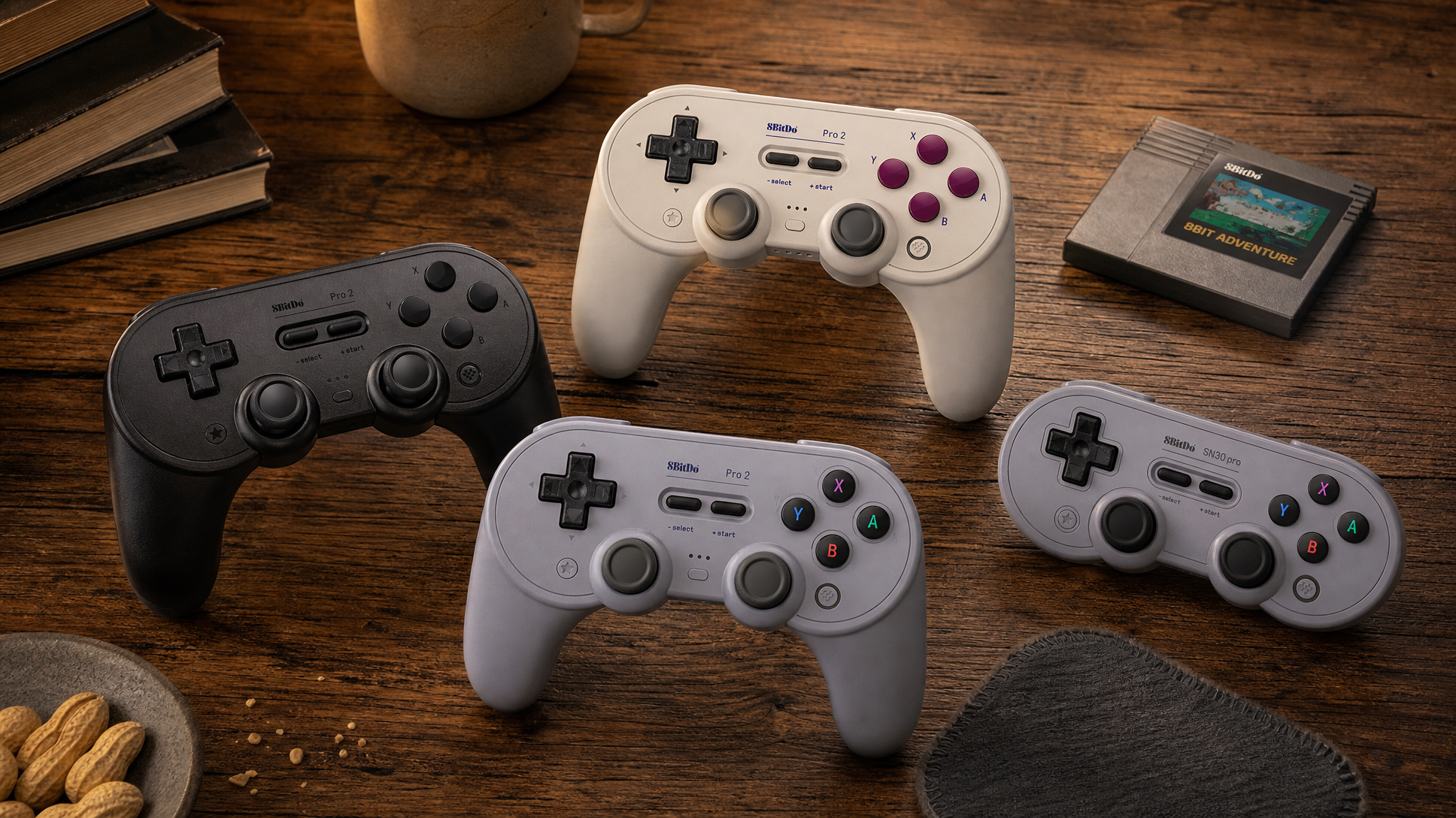
The all-black Pro 2 is the straightforward choice for PC and Steam Deck players. It's a full-size wireless controller with Hall Effect joysticks, 2 back paddles, and compatibility across Switch, PC, Android, and Steam Deck. The matte black finish is understated and the layout is immediately familiar if you've used an Xbox controller. This is the one to reach for if PC gaming is your primary use and you want something that also works on a Steam Deck without any fuss.
8Bitdo Pro 2 Gray Edition — Switch and PC Dual-Duty
The Gray Edition shares the same Hall Effect joysticks and 2 back paddles as the Black Edition but is specifically listed for Switch and Switch 2 compatibility alongside PC. The silver-gray shell with colorful ABXY buttons (red, blue, green, yellow) gives it a more playful look that fits the Nintendo aesthetic. If you game on both Switch 2 and PC, this version covers both without needing a separate controller for each platform.
8Bitdo Pro 2 G Classic Edition — Retro Aesthetic, Modern Internals
The G Classic Edition is the most visually distinctive of the three Pro 2 variants. It wears a cream-white body with deep purple-red face buttons — a clear nod to a certain beloved 16-bit console era — and sits flat rather than angled like the other two, giving it a more retro silhouette. It still has Hall Effect joysticks and is designed for Switch and Switch 2. If the look matters to you as much as the function, this one stands out on a desk.
8Bitdo SN30 Pro — When You Want Something Smaller
The SN30 Pro is a different shape entirely: a compact, rounded controller that looks like a modernized SNES pad. It's lighter and smaller than the Pro 2, which makes it a good fit for players who find full-size controllers too large, or for handheld use with a Steam Deck where bulk matters. It also features Hall Effect joysticks and works with Switch, PC, and Android. The trade-off compared to the Pro 2: the SN30 Pro has a more compact grip that some players with larger hands may find less comfortable over long sessions.
What You Can Skip Worrying About
Rumble / haptic feedback is nice but rarely a deciding factor for PC gaming — most games don't implement it meaningfully on PC anyway. RGB lighting is purely cosmetic. "Turbo" buttons are a niche feature most players never use. And proprietary software for remapping is only useful if the controller doesn't let you remap directly on the hardware itself — the 8Bitdo Pro 2 supports remapping through 8Bitdo's own app, which is free.
Don't let a spec list full of these extras distract you from the two things that actually affect daily play: joystick quality and whether the paddle placement works for your grip.
The Bottom Line
If you want back paddles on a PC controller without paying elite-tier prices, the combination of Hall Effect joysticks and 2 back paddles in the 8Bitdo Pro 2 lineup is hard to argue with. Pick the Black Edition for pure PC and Steam Deck use, the Gray Edition if you're splitting time with Switch 2, or the SN30 Pro if you want a smaller, lighter form factor. The G Classic Edition is for anyone who wants all of that wrapped in a controller that looks genuinely cool sitting on a desk.
Browse the full controllers collection at GameX24 to compare all available 8Bitdo models and find the one that fits your setup.
Frequently Asked Questions
Do back paddles work on PC games, or only on console?
Back paddles work on PC just like they do on console — they remap existing controller buttons, so any game that supports a controller will recognize the paddle inputs as whatever button you've assigned to them. The game itself doesn't need to know paddles exist; it just sees a standard button press.
What is Hall Effect and why does it matter for a controller?
Hall Effect joysticks use magnets to detect stick position instead of physical contacts. Because nothing wears down mechanically, they resist the stick drift that affects most standard controllers over time. For anyone who plays frequently, Hall Effect sticks tend to stay accurate much longer than potentiometer-based alternatives.
Is the 8Bitdo Pro 2 compatible with Steam Deck?
The 8Bitdo Pro 2 Black Edition is listed as compatible with Steam Deck alongside Switch, PC, and Android. It connects via Bluetooth, so you'll want to make sure Bluetooth is enabled on your Steam Deck or that you have a compatible USB adapter for your PC.
How is the SN30 Pro different from the Pro 2?
The main difference is size and shape. The SN30 Pro has a compact, rounded body inspired by classic SNES-era controllers, while the Pro 2 is a full-size modern gamepad with ergonomic grips. Both have Hall Effect joysticks. The SN30 Pro suits players who prefer a lighter, smaller controller; the Pro 2 fits players who want a more conventional full-size grip for longer sessions.